๐Ÿ‡ฆ๐Ÿ‡บ Built for the ATO logbook method

Automatic mileage logging for tax time

AutoTripLogger detects and records every drive in the background โ€” so your logbook is always ready, without you lifting a finger.

Download on the
App Store
โ–ถ Google Play โ€” coming soon
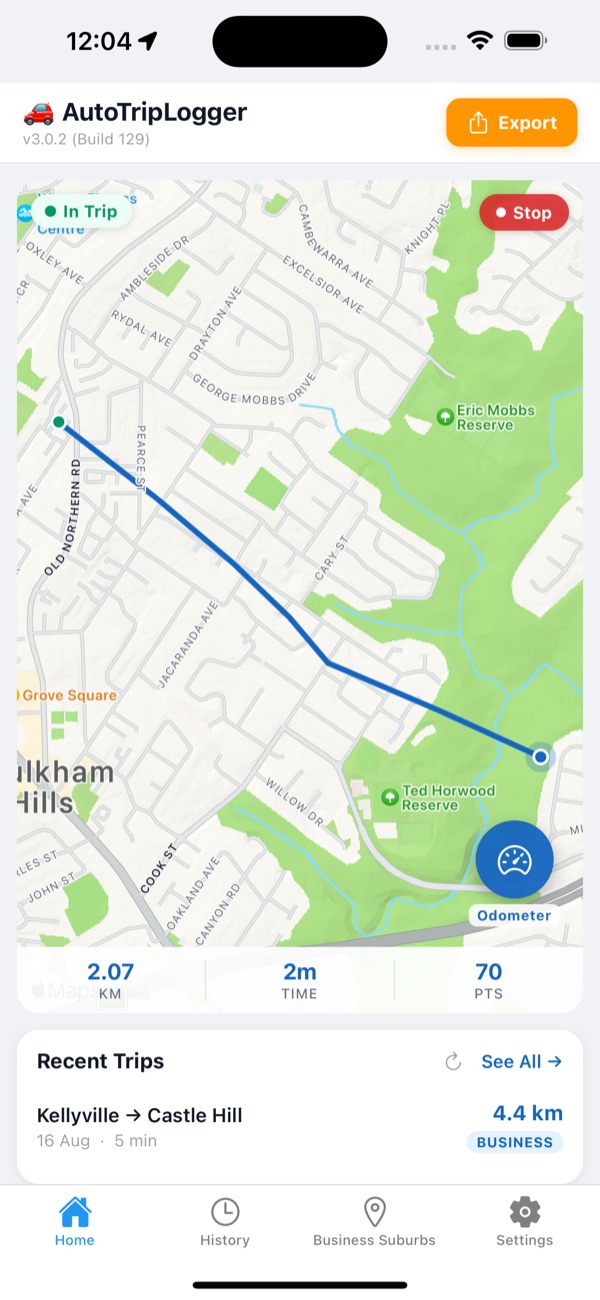
AutoTripLogger app showing business suburb detection for trip logging

Set it once. It logs everything.

No start button, no manual entry. AutoTripLogger works quietly in the background so your records are complete when you need them.

๐Ÿ›ฐ๏ธ

Automatic detection

Trips start and stop on their own โ€” the app knows when you're driving.

๐ŸŒ™

Background tracking

Keeps logging even when the app is closed, so nothing slips through.

๐Ÿข

Business vs personal

Business-area detection helps separate work trips from private ones.

๐Ÿ“„

CSV export

Export clean mileage records to a spreadsheet whenever you need them.

๐Ÿ“…

Logbook periods

Export the last 4, 6 or 12 weeks โ€” made for the ATO logbook method.

๐Ÿ”‹

Battery-conscious

Tune tracking accuracy to your device so it's easy on the battery.

Keeping an ATO logbook? We do the hard part.

The ATO's logbook method needs a continuous 12-week record of every trip. AutoTripLogger captures them automatically and exports a clean summary โ€” so you can claim your business-use percentage with confidence.

Read the ATO Logbook Guide โ†’

How it works

Three steps, then forget about it.

1

Install & allow location

Grant "Always" location so trips can be detected in the background.

2

Drive as normal

The app detects each trip, records the route and distance, and files it.

3

Export your logbook

When tax time comes, export your trips as CSV โ€” business split included.

Never log a drive by hand again.

Start your free trial and let AutoTripLogger keep your logbook for you.

Download on the
App Store